Cloud computing has changed the way businesses and individuals use IT resources.
Instead of buying and maintaining physical servers, companies can use computing resources over the Internet. They can rent servers, storage, databases, networking, and other services when they need them.
But what exactly is cloud computing, and how does it work?
In this guide, we will explain cloud computing from the basics and introduce the most important concepts beginners should understand.
What Is Cloud Computing?
Cloud computing is the delivery of computing resources and services over the Internet.
These resources can include:
- Servers
- Storage
- Databases
- Networking
- Virtual machines
- Applications
- Security services
- Monitoring tools
- Development platforms
Instead of purchasing a physical server and keeping it in your office, you can rent a virtual server from a cloud provider and access it through the Internet.
For example, instead of:
Company
   ↓
Physical Server
   ↓
Storage
   ↓
Applications
A cloud environment can look like:
Company
   ↓
Internet
   ↓
Cloud Provider
   ↓
Virtual Server
   ↓
Application
The cloud provider manages the underlying physical infrastructure while you use the resources you need.
How Does Cloud Computing Work?
Cloud providers operate large data centers containing thousands of physical servers, storage systems, and networking devices.
These physical resources are combined and managed using virtualization and other technologies.
A simplified architecture looks like this:
             Internet
                |
        +-------+-------+
        |               |
      Users         Applications
        |               |
        +-------+-------+
                |
          Cloud Platform
                |
      +---------+---------+
      |         |         |
    Compute   Storage   Database
      |         |         |
      +---------+---------+
                |
          Physical Servers
                |
           Data Center
Users interact with the cloud through web interfaces, applications, APIs, or command-line tools.
Why Do Companies Use the Cloud?
One of the biggest advantages of cloud computing is flexibility.
With traditional infrastructure, a company might need to purchase a server before launching a new application.
This can require:
- Hardware
- Rack space
- Power
- Cooling
- Network equipment
- Operating system licenses
- Maintenance
- IT administration
With cloud computing, many of these resources can be created within minutes.
For example, a company can create a virtual server, install an application, and make it available to users without purchasing a physical server.
The 3 Main Cloud Service Models
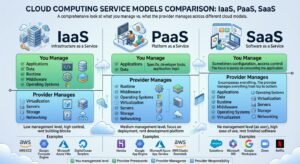
Cloud services are commonly divided into three main models:
- IaaS
- PaaS
- SaaS
Let’s look at each one.
1. IaaS — Infrastructure as a Service
IaaS provides basic computing infrastructure.
You can rent resources such as:
- Virtual machines
- Storage
- Networks
- Firewalls
- IP addresses
The cloud provider manages the physical infrastructure while you manage more of the software environment.
Example:
Cloud Provider
├── Physical Server
├── Storage
└── Network

You
├── Virtual Machine
├── Operating System
├── Applications
└── Data
IaaS is useful when you need more control over your server environment.
2. PaaS — Platform as a Service
PaaS provides a platform for developing and running applications.
The provider manages much of the infrastructure and operating system, allowing developers to focus mainly on their applications.
For example:
Cloud Provider
├── Hardware
├── Network
├── Storage
├── Operating System
└── Runtime Platform

Developer
└── Application
PaaS is especially useful for software development teams.
3. SaaS — Software as a Service
SaaS provides complete software applications through the Internet.
Users normally don’t need to manage servers or operating systems.
Examples include:
- Online email
- Cloud storage
- Online office applications
- Customer management systems
- Collaboration platforms
A simplified model is:
Cloud Provider
├── Infrastructure
├── Operating System
├── Application
└── Data Platform

User
└── Uses the Application
You simply access the software through a browser or application.
IaaS vs PaaS vs SaaS
| Model | What You Get | Typical User |
|---|---|---|
| IaaS | Virtual infrastructure | IT administrators |
| PaaS | Application development platform | Developers |
| SaaS | Ready-to-use application | End users |
A simple way to remember them:
IaaS → You manage more
PaaS → Provider manages more
SaaS → Provider manages almost everything
Public Cloud vs Private Cloud vs Hybrid Cloud
Cloud environments can also be classified by how they are deployed.
Public Cloud
A public cloud is operated by a cloud provider and made available to multiple customers.
Examples include major cloud platforms such as:
- Amazon Web Services
- Microsoft Azure
- Google Cloud
Companies can rent resources without owning the physical infrastructure.
Private Cloud
A private cloud is dedicated to one organization.
The infrastructure may be hosted:
- Inside the company’s data center
- By a third-party provider
- In a dedicated environment
Private clouds can provide greater control but usually require more management.
Hybrid Cloud
A hybrid cloud combines private infrastructure with public cloud resources.
For example:
Company Data Center
        |
        | VPN / Dedicated Connection
        |
Public Cloud
A company might keep sensitive systems in its private environment while using public cloud resources for applications or additional computing capacity.
Main Benefits of Cloud Computing
1. Scalability
Cloud resources can be increased or decreased depending on demand.
For example, an online store may need more servers during a major sales event.
2. Cost Flexibility
Instead of purchasing large amounts of hardware upfront, companies can pay for cloud resources according to their usage or subscription model.
This can reduce initial infrastructure costs.
3. Availability
Cloud providers typically operate multiple data centers and infrastructure components to help keep services available.
However, availability is not automatic—you still need to design applications correctly.
4. Fast Deployment
Cloud resources can often be created much faster than traditional physical infrastructure.
A virtual machine can potentially be deployed in minutes.
5. Remote Access
Cloud services can be accessed from different locations as long as users have appropriate network connectivity and permissions.
This is particularly useful for distributed teams.
6. Automation
Cloud environments provide APIs and automation tools that allow administrators and developers to automate infrastructure deployment and management.
For example:
Configuration
      ↓
Automation Tool
      ↓
Cloud API
      ↓
Virtual Infrastructure
Common Cloud Computing Technologies
Several technologies are closely related to cloud computing.
Virtualization
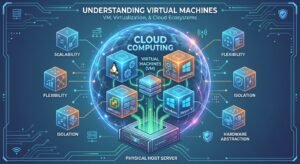
Virtualization allows multiple virtual machines to run on physical servers.
Containers
Containers package applications and their dependencies into portable environments.
APIs
Cloud platforms provide APIs that allow applications and automation tools to communicate with cloud services.
Load Balancing
Load balancers distribute traffic across multiple servers.
Cloud Storage
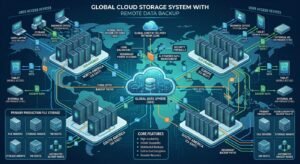
Cloud storage allows applications and users to store files and data on remote infrastructure.
Popular Cloud Platforms
Some of the most widely used cloud platforms include:
Amazon Web Services (AWS)
AWS provides a large collection of cloud services covering computing, storage, databases, networking, security, and more.
Microsoft Azure
Azure provides cloud infrastructure and services and integrates particularly well with many Microsoft technologies.
Google Cloud
Google Cloud provides infrastructure, data, networking, AI, and application services.
Other providers also exist, including regional and specialized cloud platforms.
Cloud Computing and Virtual Machines
Virtual machines are an important part of many cloud environments.
For example, a cloud provider may have a physical server like:
Physical Server
+-------------------------+
| VM 1 | VM 2 | VM 3 | VM4 |
+-------------------------+
Each virtual machine can have its own:
- CPU allocation
- RAM
- Storage
- Operating system
- IP configuration
This allows cloud providers to efficiently use physical infrastructure.
Is Cloud Computing Secure?
Cloud computing can be secure, but security depends heavily on configuration and management.
Common cloud security risks include:
- Weak passwords
- Exposed storage
- Incorrect firewall rules
- Excessive user permissions
- Unpatched systems
- Exposed API keys
- Misconfigured cloud services
A good cloud security strategy should include:
- Strong authentication
- Multi-factor authentication
- Least-privilege access
- Network segmentation
- Encryption
- Logging and monitoring
- Regular backups
- Security updates
Remember:
Moving infrastructure to the cloud does not automatically make it secure.
Cloud Computing vs Traditional IT
| Traditional IT | Cloud Computing |
|---|---|
| Physical servers | Virtual/cloud resources |
| Large upfront investment | Flexible usage |
| Hardware managed internally | Infrastructure managed by provider |
| Manual provisioning | Fast provisioning |
| Limited scalability | Easy scalability |
| Data center required | Provider data centers |
| Hardware replacement required | Provider manages physical hardware |
Cloud computing doesn’t completely replace traditional IT. Many organizations use a combination of on-premises and cloud infrastructure.
Real-World Example
Imagine you want to launch a website.
Traditional approach
You might need:
Server
Storage
Network
Firewall
Operating System
Backup
Power
Cooling
You need to purchase and maintain all of these components.
Cloud approach
You could instead:
Choose Cloud Provider
        ↓
Create Virtual Server
        ↓
Install Web Server
        ↓
Deploy Website
        ↓
Configure DNS
        ↓
Monitor Application
You can then increase resources if the website receives more traffic.
What Should Beginners Learn First?
If you’re starting your cloud journey, don’t try to learn everything at once.
A good learning path is:
Step 1 — Networking
Learn:
- IP addresses
- Subnetting
- DNS
- DHCP
- Routing
- Firewalls
- TCP/IP
You can start with our Networking Basics article.
Step 2 — Linux and Windows
Understand operating systems and basic server administration.
Step 3 — Virtualization
Learn how virtual machines work.
Step 4 — Cloud Fundamentals
Understand:
- IaaS
- PaaS
- SaaS
- Public cloud
- Private cloud
- Hybrid cloud
Step 5 — Choose a Cloud Platform
Start with one platform rather than trying to learn AWS, Azure, and Google Cloud simultaneously.
Step 6 — Practice
Create small projects such as:
- Deploying a Linux server
- Hosting a website
- Configuring DNS
- Creating a virtual network
- Setting up a firewall
- Monitoring a cloud server
Conclusion
Cloud computing allows organizations and individuals to use computing resources over the Internet without owning all the underlying physical infrastructure.
The most important concepts for beginners are:
- IaaS — Infrastructure as a Service
- PaaS — Platform as a Service
- SaaS — Software as a Service
- Public, private, and hybrid clouds
- Virtual machines
- Cloud storage
- Networking
- Security
- Scalability
Once you understand these fundamentals, you can start exploring platforms such as AWS, Azure, or Google Cloud and move toward more advanced cloud administration and DevOps.
FAQ
What is cloud computing?
Cloud computing is the delivery of computing resources such as servers, storage, databases, and applications over the Internet.
Is cloud computing the same as the Internet?
No. The Internet is the global network connecting systems, while cloud computing uses network connectivity to provide computing services remotely.
What are the three main cloud service models?
The three main models are IaaS, PaaS, and SaaS.
Is cloud computing expensive?
It depends on usage and the services selected. Cloud computing can reduce upfront infrastructure costs, but poorly managed resources can become expensive.
Is cloud computing secure?
Cloud platforms provide many security features, but customers are still responsible for correctly configuring their services, access controls, networks, and applications.
What should I learn before cloud computing?
Networking, operating systems, virtualization, and basic security are excellent foundations.