Introduction
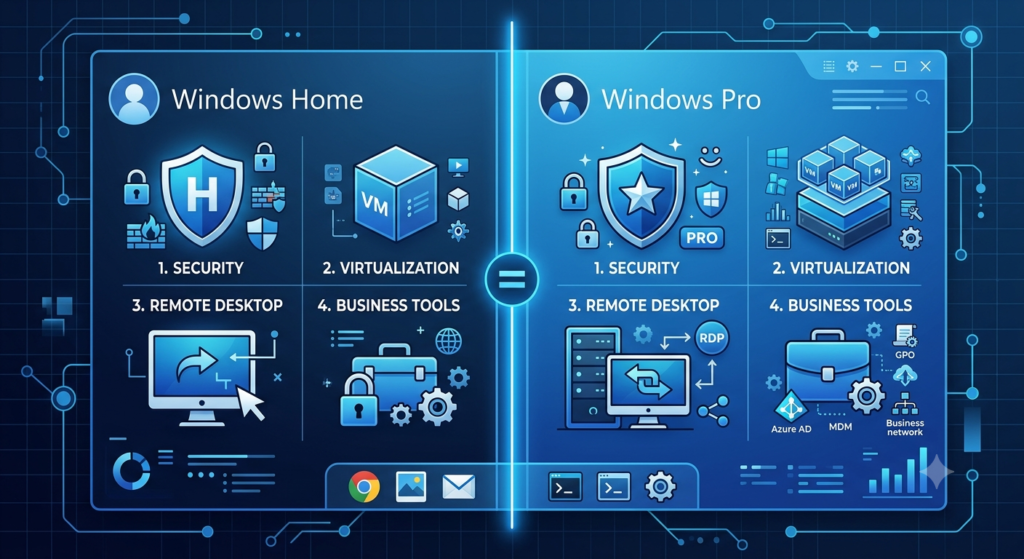
Choosing the right edition of Windows is an important decision when buying a new computer or upgrading your operating system. Microsoft offers two of the most popular editions: Windows Home and Windows Pro.
At first glance, both versions look almost identical. They share the same interface, receive the same updates, and run the same applications. However, Windows Pro includes additional features designed for professionals, businesses, and advanced users.
In this guide, we’ll compare Windows Home and Windows Pro, explain their differences, and help you decide which edition best fits your needs.
What Is Windows Home?
Windows Home is the standard edition that comes pre-installed on most consumer laptops and desktop computers.
It is designed for everyday users who need a reliable operating system for:
- Web browsing
- Watching videos
- Gaming
- Office work
- Online learning
- Personal productivity
For most home users, Windows Home provides everything needed for daily computing.
What Is Windows Pro?
Windows Pro includes everything available in Windows Home plus additional features intended for business environments and IT professionals.
Windows Pro is commonly used by:
- Companies
- System administrators
- Developers
- IT support engineers
- Remote workers
- Small businesses
These extra tools make managing and securing computers much easier in professional environments.
Feature Comparison
| Feature | Windows Home | Windows Pro |
|---|---|---|
| Microsoft Store | ✅ | ✅ |
| Windows Update | ✅ | ✅ |
| Microsoft Defender | ✅ | ✅ |
| BitLocker Drive Encryption | ❌ | ✅ |
| Remote Desktop (Host) | ❌ | ✅ |
| Hyper-V Virtualization | ❌ | ✅ |
| Group Policy Editor | ❌ | ✅ |
| Join Active Directory | ❌ | ✅ |
| Windows Sandbox | ❌ | ✅ |
| Assigned Access (Kiosk Mode) | ❌ | ✅ |
Key Differences Explained
1. BitLocker Encryption
BitLocker encrypts your hard drive to protect your data if your laptop is lost or stolen.
Windows Home
- Device encryption may be available on some supported hardware, but full BitLocker management is not included.
Windows Pro
- Includes full BitLocker with advanced management options.
Best for:
- Business laptops
- Sensitive company data
- IT professionals
2. Remote Desktop
Remote Desktop allows you to connect to your computer from another device.
Windows Home
- Can connect to another Remote Desktop host, but cannot act as the host using Microsoft’s built-in Remote Desktop service.
Windows Pro
- Can both host and receive Remote Desktop connections.
Useful for:
- Remote work
- IT support
- Home lab environments
3. Hyper-V
Hyper-V is Microsoft’s built-in virtualization platform.
It allows you to create virtual machines to run different operating systems without additional software.
Example:
- Windows Server
- Ubuntu
- Kali Linux
- Windows 10
Hyper-V is available in Windows Pro.
4. Group Policy
Group Policy allows administrators to control Windows settings across one or many computers.
Examples include:
- Password policies
- USB restrictions
- Windows Update settings
- Security configurations
This feature is primarily intended for business environments.
5. Active Directory
Organizations use Active Directory to manage users, computers, and security policies.
Windows Pro computers can join an Active Directory domain, making centralized management possible.
Windows Home cannot join a traditional Active Directory domain.
Performance
Many people believe Windows Pro is faster.
In reality:
- Both editions have nearly identical performance for everyday tasks.
- Gaming performance is generally the same.
- Productivity applications run similarly.
The extra features in Windows Pro are mainly focused on management, security, and enterprise functionality—not raw speed.
Which Version Should You Choose?
Choose Windows Home if you:
- Use your computer for personal tasks
- Browse the internet
- Watch videos
- Play games
- Study online
- Use Microsoft Office
Windows Home is sufficient for most users.
Choose Windows Pro if you:
- Work in IT
- Manage business computers
- Need BitLocker
- Need Hyper-V
- Use Remote Desktop hosting
- Join corporate networks
- Build virtual labs
Windows Pro is a better fit for professional and business use.
FAQ
Can I upgrade from Windows Home to Windows Pro?
Yes. Microsoft allows you to upgrade without reinstalling Windows by purchasing a Windows Pro upgrade license.
Is Windows Pro worth the extra cost?
If you need business features like BitLocker, Hyper-V, or Remote Desktop hosting, the upgrade can be worthwhile. Otherwise, Windows Home is sufficient for most personal use.
Does Windows Pro improve gaming performance?
No. Games generally perform the same on both editions.
Which version do businesses use?
Most businesses choose Windows Pro because of its management and security capabilities.
Conclusion
Windows Home and Windows Pro share the same core experience, but Windows Pro offers advanced tools designed for professionals and organizations. If you mainly use your computer for everyday activities, Windows Home is an excellent choice. If you work in IT, manage multiple devices, or need enterprise features, Windows Pro provides valuable additional capabilities.