Every time you send an email, stream a video, or open a shared file at work, you’re relying on computer networking — the system of rules and hardware that lets separate devices talk to each other. It’s one of the most fundamental concepts in all of IT, and understanding it well makes almost every other technical topic (servers, cloud computing, cybersecurity) make more sense.
The Simple Definition
Computer networking is the practice of connecting multiple devices — computers, servers, printers, phones — so they can share data and resources with each other. A network can be as small as two laptops connected directly, or as large as the entire internet, which is really just a massive network of networks.
Why Networks Exist
Before networking became standard, computers were isolated islands — sharing a file meant physically copying it to a disk and walking it to another machine. Networking solves several problems at once:
- Resource sharing — one printer, one internet connection, or one file server can serve many devices instead of needing duplicates for everyone
- Communication — email, messaging, video calls, all depend on networked devices exchanging data
- Centralized management — as we covered in our Active Directory guide, centrally managing users and security across many devices only works because those devices are networked together
- Access to remote resources — cloud storage, remote servers, and websites all rely on your device reaching machines that could be anywhere in the world
The Core Building Blocks
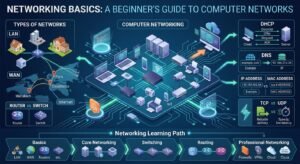
Devices (Nodes) — anything connected to the network: computers, servers, phones, printers, smart devices
Network Interface — the hardware (physical or wireless) that lets a device connect to a network, like a Wi-Fi adapter or Ethernet port
Switches — connect devices within the same local network, forwarding data only to the specific device it’s meant for
Routers — connect different networks together, most commonly your local network to the wider internet
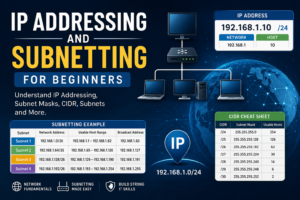
IP Addresses — the unique numerical address every device on a network needs, so data knows where to go (similar in concept to a street address for physical mail)
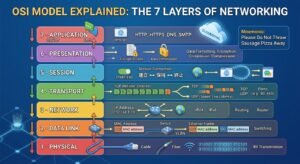
Protocols — the agreed-upon rules that let devices understand each other, even if built by different manufacturers. TCP/IP is the foundational protocol suite the entire internet runs on
Types of Networks
LAN (Local Area Network) — a network confined to one physical location, like an office, home, or school building
WAN (Wide Area Network) — a network spanning a large geographic area, connecting multiple LANs together — the internet itself is the largest WAN in existence
WLAN (Wireless LAN) — a LAN that uses Wi-Fi instead of physical cables to connect devices
VPN (Virtual Private Network) — a secure, encrypted connection over a public network (like the internet), letting a remote user or office access another network as though they were physically connected to it
We cover LAN vs WAN, VLANs, DNS, and DHCP in more depth in separate guides — this article is meant to give you the full-picture foundation those deeper topics build on.
How Data Actually Travels Across a Network
At a basic level, when you request a webpage or send an email, your data is broken into small packets, each stamped with the destination address, sent across whatever path of routers and switches gets it there fastest, and reassembled at the destination. This happens in milliseconds, across potentially many intermediate networks, using the TCP/IP protocol suite as the universal language that makes it all work regardless of hardware manufacturer or operating system.
Why This Matters for an IT Career
Networking fundamentals underpin nearly every other IT specialization:
- System administrators need networking to manage servers and troubleshoot connectivity issues
- Cybersecurity professionals need deep networking knowledge to understand how attacks travel and how to defend against them
- Cloud engineers work constantly with virtual networks, load balancers, and routing between cloud services
- Help desk / support roles deal with basic networking troubleshooting daily — a huge share of “my internet isn’t working” tickets trace back to networking fundamentals
This is also why certifications like Cisco’s CCNA are so widely respected they validate genuine, hands-on networking competence that transfers across almost every IT role.
FAQ
Do I need to understand networking if I want to work in cybersecurity? Yes, deeply. Most attacks and defenses happen at the network level — understanding how data actually moves, what a firewall does, and how protocols work is foundational, not optional, for cybersecurity work.
What’s the difference between the internet and a network? The internet is a network — specifically, the largest WAN in existence, connecting billions of smaller networks together globally. Your home Wi-Fi is also a network, just a much smaller, private one that connects to the internet through your router.
Is networking knowledge still relevant with everything moving to the cloud? More relevant than ever, actually. Cloud computing still runs entirely on networking principles — virtual networks, routing, load balancing, and security groups in AWS or Azure are the same core concepts applied in a virtualized environment rather than physical hardware.
Conclusion
Computer networking is the invisible infrastructure connecting nearly everything you do with technology. Understanding its fundamentals — devices, addressing, protocols, and how data actually travels — gives you the foundation to understand cybersecurity, cloud computing, and system administration far more deeply than memorizing isolated facts in each area separately.