Computer networking is one of the most important foundations of IT.
Every time you open a website, send an email, connect to Wi-Fi, or access a cloud application, networking is working in the background.
If you’re starting a career in IT, understanding networking basics will help you troubleshoot computers, configure network devices, work with servers, and understand cybersecurity and cloud infrastructure.
In this guide, we’ll explain the main networking concepts beginners should know.
What Is Computer Networking?
Computer networking is the process of connecting devices so they can communicate and exchange data.
A network can connect:
- Computers
- Servers
- Smartphones
- Printers
- Routers
- Switches
- Cameras
- IoT devices
For example, a small office network might look like this:
Internet
   |
Router
   |
Switch
 |  |  |  |
PC PC Printer Server
The devices communicate using networking protocols.
1. What Is a LAN?
LAN stands for Local Area Network.
A LAN connects devices within a limited geographical area, such as:
- Home
- Office
- School
- Building
- Small campus
For example, the computers and printers inside an office can communicate through a LAN.
2. What Is a WAN?
WAN stands for Wide Area Network.
A WAN connects networks over larger geographical distances.
The Internet is the largest example of a WAN.
A company with offices in:
Marrakech
   |
Casablanca
   |
Paris
could connect those locations using WAN technologies or VPNs.
3. What Is an IP Address?
An IP address identifies a device on a network.
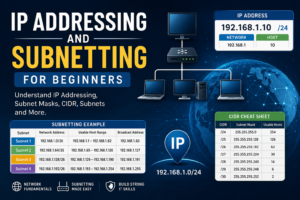
An IPv4 address looks like:
192.168.1.10Each device on a network needs an appropriate IP configuration to communicate.
A typical IPv4 configuration contains:
IP Address:      192.168.1.10
Subnet Mask:     255.255.255.0
Default Gateway: 192.168.1.1
DNS Server:      8.8.8.8
We’ll explore IP addressing in much more detail in a future article.
4. Private vs Public IP Addresses
There are two important categories of IPv4 addresses.
Private IP
Private addresses are commonly used inside local networks.
Common private ranges include:
10.0.0.0/8
172.16.0.0/12
192.168.0.0/16
For example:
192.168.1.25is a private IP address.
Public IP
A public IP address is used to communicate across the Internet.
Your router may have a public IP assigned by your Internet Service Provider.
5. What Is a Router?
A router connects different networks.
For example:
LAN
 |
Router
 |
Internet
The router decides where network traffic should go.
A typical home router can also provide:
- DHCP
- NAT
- Wi-Fi
- Firewall functions
- DNS forwarding
In enterprise environments, routers can perform much more advanced routing functions.
6. What Is a Switch?
A network switch connects devices within a local network.
For example:
       Switch
      /  |  \
    PC  PC  Printer
Switches use MAC addresses to forward Ethernet frames to the appropriate devices.
Enterprise switches can also support features such as:
- VLANs
- STP
- Link aggregation
- Port security
- PoE
We’ll cover these concepts in future Networking articles.
7. Router vs Switch
A common beginner question is:
What’s the difference between a router and a switch?
| Router | Switch |
|---|---|
| Connects different networks | Connects devices in a network |
| Uses IP addresses for routing | Uses MAC addresses for Ethernet forwarding |
| Connects LAN to WAN | Primarily operates within LANs |
| Can perform NAT | Usually does not perform NAT |
In a simple network:
Internet
    |
  Router
    |
  Switch
  / | \
 PC PC Printer
The router provides connectivity to other networks, while the switch connects local devices.
8. What Is DNS?
DNS stands for Domain Name System.
DNS translates domain names into IP addresses.
For example:
example.com
     ↓
93.184.216.34
Without DNS, users would have to remember IP addresses instead of domain names.
You can test DNS resolution from a Linux terminal using:
nslookup example.comor:
dig example.com9. What Is DHCP?
DHCP stands for Dynamic Host Configuration Protocol.
DHCP automatically provides network configuration to devices.
Instead of manually configuring every computer, a DHCP server can provide:
IP Address
Subnet Mask
Default Gateway
DNS Server
A typical process looks like:
Client
  |
DHCP Discover
  |
DHCP Server
  |
DHCP Offer
  |
Client
  |
DHCP Request
  |
DHCP Server
  |
DHCP ACK
This is extremely common in home and enterprise networks.
10. What Is a MAC Address?
A MAC address is a hardware-level address associated with a network interface.
An example looks like:
00:1A:2B:3C:4D:5ESwitches use MAC addresses to determine where Ethernet frames should be forwarded.
You can view network interface information on Linux with:
ip linkOn Windows, you can use:
ipconfig /all11. What Are Network Protocols?
Protocols are rules that define how devices communicate.
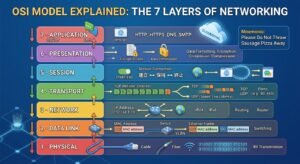
Some important protocols include:
| Protocol | Purpose |
|---|---|
| HTTP | Web communication |
| HTTPS | Secure web communication |
| DNS | Name resolution |
| DHCP | Automatic IP configuration |
| SSH | Secure remote access |
| FTP | File transfer |
| SMTP | Sending email |
| TCP | Reliable transport |
| UDP | Connectionless transport |
| ICMP | Network diagnostics |
Understanding protocols is essential for troubleshooting network problems.
12. TCP vs UDP
TCP and UDP are two important transport protocols.
TCP
TCP provides reliable, ordered communication.
It is commonly used for applications where reliable delivery is important.
Examples include:
- HTTPS
- SSH
- FTP
UDP
UDP is connectionless and has lower protocol overhead.
It is useful for applications where speed and low latency are important.
Examples can include:
- DNS
- Streaming
- Voice communication
- Some online games
The choice between TCP and UDP depends on the application.
13. What Is a Port?
A network port helps identify a specific service running on a device.
For example:
| Port | Common Service |
|---|---|
| 22 | SSH |
| 53 | DNS |
| 80 | HTTP |
| 443 | HTTPS |
| 25 | SMTP |
| 3389 | RDP |
For example, a web server may listen on:
TCP 443for HTTPS traffic.
14. What Is a Subnet Mask?
A subnet mask determines which part of an IPv4 address represents the network and which part represents the host.
Example:
IP Address: 192.168.1.10
Subnet Mask: 255.255.255.0
This is commonly written as:
192.168.1.10/24Understanding subnetting is an important networking skill.
We’ll dedicate a future article to subnetting because it deserves a complete explanation.
15. What Is a Default Gateway?
The default gateway is the device a computer uses to reach other networks.
For example:
PC
 |
192.168.1.1
 |
Router
 |
Internet
If your computer wants to communicate with a destination outside its local network, it normally sends the traffic to its default gateway.
16. What Is a Firewall?
A firewall controls network traffic according to configured security rules.
It can allow or block traffic based on factors such as:
- Source IP
- Destination IP
- Port
- Protocol
- Interface
- Application
For example:
Internet
   |
Firewall
   |
Internal Network
Firewalls are an essential part of network security.
17. What Is Wi-Fi?
Wi-Fi allows devices to communicate over a wireless network.
Instead of using Ethernet cables, devices communicate through radio signals with a wireless access point or router.
A basic network might look like:
Internet
    |
 Router
    |
Wi-Fi Access Point
 /      |       \
Laptop  Phone   Tablet
Wi-Fi is convenient, but wired Ethernet can still provide advantages in some environments, including predictable performance and lower susceptibility to wireless interference.
18. Basic Network Troubleshooting
When a device cannot access the network, don’t immediately start changing random settings.
Follow a logical troubleshooting process.
Step 1 — Check the physical connection
Check:
- Ethernet cable
- Wi-Fi connection
- Link lights
- Network adapter
Step 2 — Check the IP configuration
Windows:
ipconfigLinux:
ip addrStep 3 — Test the local gateway
ping 192.168.1.1Step 4 — Test Internet connectivity
ping 8.8.8.8Step 5 — Test DNS
ping google.comIf an IP address works but a domain name doesn’t, DNS could be the problem.
This simple process can help you identify where the problem is occurring.
How Data Travels Through a Network
When you access a website, several things happen.
For example:
Your Computer
      ↓
Switch / Wi-Fi
      ↓
Router
      ↓
Internet
      ↓
Web Server
Your computer uses DNS to find the server’s IP address.
It then communicates with the destination using networking protocols such as TCP and HTTPS.
All of this happens in seconds.
Networking Learning Path
If you’re beginning your networking journey, follow this order:
Level 1 — Basics
Learn:
- LAN
- WAN
- IP addresses
- MAC addresses
- Routers
- Switches
- DNS
- DHCP
Level 2 — Core Networking
Learn:
- OSI model
- TCP/IP model
- TCP vs UDP
- Ports
- Subnetting
- ARP
- ICMP
Level 3 — Switching
Learn:
- VLANs
- Trunking
- STP
- EtherChannel
- Port security
Level 4 — Routing
Learn:
- Static routing
- Default routes
- OSPF
- Routing tables
- NAT
Level 5 — Professional Networking
Move toward:
- Firewalls
- VPNs
- Network security
- Network monitoring
- Cloud networking
- Cisco networking
Conclusion
Networking is one of the most important foundations in IT.
Understanding IP addresses, routers, switches, DNS, DHCP, ports, protocols, and basic troubleshooting gives you the foundation needed to move into more advanced networking topics.
Don’t try to memorize everything at once.
Start with the fundamentals, practice in a lab environment, and gradually build your knowledge.
FAQ
What should I learn first in networking?
Start with IP addresses, subnet masks, routers, switches, DNS, DHCP, and basic troubleshooting.
What is the difference between a router and a switch?
A switch primarily connects devices within a network, while a router connects different networks.
What is DNS?
DNS translates domain names into IP addresses.
What is DHCP?
DHCP automatically provides devices with network configuration such as IP addresses, gateways, and DNS servers.
Is networking important for cybersecurity?
Yes. Understanding networking is extremely useful for learning cybersecurity because many security concepts depend on understanding traffic, protocols, ports, and network architecture.