If you’re learning networking, you’ve probably heard about the OSI model.
The OSI model is one of the most important concepts for understanding how devices communicate across a network.
It divides network communication into seven different layers, with each layer responsible for a specific function.
You don’t need to memorize everything immediately. The goal is to understand what each layer does and how the layers work together.
What Is the OSI Model?
OSI stands for Open Systems Interconnection.
The OSI model provides a conceptual framework for understanding network communication.
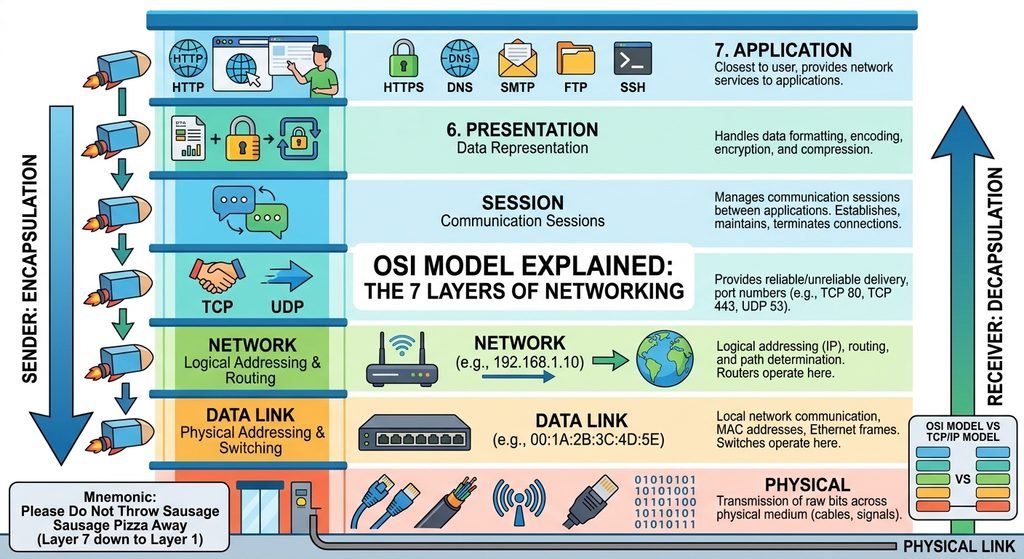
It divides communication into seven layers:
7 — Application
6 — Presentation
5 — Session
4 — Transport
3 — Network
2 — Data Link
1 — Physical
A simple way to remember them is:
Please Do Not Throw Sausage Pizza Away
From Layer 7 down to Layer 1:
- P — Presentation
- D — ?
- N — Network
- T — Transport
- S — Session
- P — Presentation
- A — Application
A more useful approach is simply to understand the purpose of each layer.
Layer 1 — Physical
The Physical layer deals with the actual transmission of bits across a physical medium.
It includes things such as:
- Ethernet cables
- Fiber-optic cables
- Radio signals
- Connectors
- Electrical signals
- Physical network interfaces
Data at this level is transmitted as:
0s and 1sWhen you connect a computer to a switch using an Ethernet cable, the physical connection belongs to Layer 1.
Example
Common Layer 1 problems
- Damaged cable
- Unplugged cable
- Bad connector
- Network interface problem
- Wireless signal problems
Layer 2 — Data Link
The Data Link layer is responsible for communication between devices on the same local network.
One important concept here is the MAC address.
Example:
00:1A:2B:3C:4D:5EEthernet frames operate at this layer.
Network switches primarily operate at Layer 2.
Important Layer 2 concepts
- MAC addresses
- Ethernet frames
- Switches
- VLANs
- STP
Example
When a switch receives an Ethernet frame, it examines the destination MAC address to determine where to forward it.
Layer 3 — Network
The Network layer handles logical addressing and routing between networks.
The most important concept here is the IP address.
Example:
192.168.1.10Routers operate primarily at Layer 3.
Important Layer 3 concepts
- IPv4
- IPv6
- IP addresses
- Routing
- Routers
- ICMP
For example:
PC
 |
Router
 |
Internet
The router uses Layer 3 information to determine where traffic should go.
Layer 4 — Transport
The Transport layer provides communication between applications running on different devices.
The two most important protocols here are:
- TCP
- UDP
TCP
TCP provides reliable, ordered communication.
It is commonly used by applications where reliable delivery is important.
UDP
UDP is connectionless and has less protocol overhead.
It can be useful when low latency is more important than guaranteed delivery.
Ports
Transport protocols also use port numbers.
Examples:
TCP 22   → SSH
TCP 80   → HTTP
TCP 443  → HTTPS
UDP 53   → DNS
Layer 5 — Session
The Session layer manages communication sessions between applications.
It can help establish, maintain, and terminate sessions.
In modern networking, the functions associated with the OSI Session layer are often handled by application protocols and other parts of the networking stack rather than by a clearly separate layer.
For beginners, remember:
Layer 5 manages communication sessions.
Layer 6 — Presentation
The Presentation layer deals with how data is represented.
Its responsibilities can include:
- Data formatting
- Encoding
- Encryption
- Compression
The goal is to make sure information can be properly interpreted between systems.
For example, data may need to be converted into a format that another system can understand.
Layer 7 — Application
The Application layer is closest to the user and provides network services to applications.
Examples include:
- HTTP
- HTTPS
- DNS
- SMTP
- FTP
- SSH
When you open a website, your browser interacts with application-layer protocols such as HTTP or HTTPS.
The 7 OSI Layers at a Glance
| Layer | Name | Main Concept |
|---|---|---|
| 7 | Application | Network services |
| 6 | Presentation | Data representation |
| 5 | Session | Sessions |
| 4 | Transport | TCP, UDP, ports |
| 3 | Network | IP, routing |
| 2 | Data Link | MAC, Ethernet, switching |
| 1 | Physical | Cables, signals, bits |
OSI Model Example
Imagine you open:
https://example.comA simplified communication process looks like:
Application
     ↓
Presentation
     ↓
Session
     ↓
Transport
     ↓
Network
     ↓
Data Link
     ↓
Physical
At the sender, data moves down through the layers.
At the receiving device, the process happens in the opposite direction.
Sender                     Receiver

Layer 7                    Layer 7
   ↓                          ↑
Layer 6                    Layer 6
   ↓                          ↑
Layer 5                    Layer 5
   ↓                          ↑
Layer 4                    Layer 4
   ↓                          ↑
Layer 3                    Layer 3
   ↓                          ↑
Layer 2                    Layer 2
   ↓                          ↑
Layer 1  ─────────────── →  Layer 1
This concept is called encapsulation and decapsulation.
What Is Encapsulation?
As data moves down the networking stack, each layer adds information needed for communication.
A simplified representation is:
Application Data
      ↓
TCP Header + Data
      ↓
IP Header + TCP + Data
      ↓
Ethernet Header + IP + TCP + Data
The receiving device removes these headers as the data moves back up the stack.
OSI Model vs TCP/IP Model
You may also hear about the TCP/IP model.
The TCP/IP model is more closely related to the protocols used on the Internet.
A simplified comparison is:
| OSI | TCP/IP |
|---|---|
| Application | Application |
| Presentation | Application |
| Session | Application |
| Transport | Transport |
| Network | Internet |
| Data Link | Network Access |
| Physical | Network Access |
The OSI model is often used as a learning and troubleshooting framework, while the TCP/IP model more closely reflects real-world Internet protocol architecture.
OSI Model and Network Troubleshooting
The OSI model is particularly useful when troubleshooting.
Instead of randomly changing settings, work through the layers.
Layer 1 — Physical
Check:
- Cable
- Wi-Fi
- Link light
- Network adapter
Layer 2 — Data Link
Check:
- VLAN
- MAC address
- Switch port
- STP
Layer 3 — Network
Check:
- IP address
- Subnet mask
- Gateway
- Routing
Layer 4 — Transport
Check:
- TCP/UDP
- Ports
- Firewall rules
Layers 5–7
Check:
- Sessions
- Data format
- Application
- DNS
- HTTP/HTTPS
- Application configuration
This approach helps you troubleshoot problems systematically.
Practical Example
Imagine a PC cannot access a website.
You could troubleshoot like this:
Layer 1
Is the Ethernet cable connected?
PC → SwitchLayer 2
Is the PC connected to the correct VLAN?
Layer 3
Does the PC have an IP address?
ip addrCan it reach the gateway?
ping 192.168.1.1Layer 4
Is the required port accessible?
For HTTPS:
TCP 443Layer 7
Can DNS resolve the website?
nslookup example.comCan the application access the website?
curl https://example.comThis is much better than simply restarting everything and hoping the problem disappears.
Do You Need to Memorize the OSI Model?
You should know the seven layers, but understanding their purpose is more important than memorizing definitions word-for-word.
For IT support and networking jobs, you should be comfortable explaining:
Layer 1 → Physical
Layer 2 → MAC / Switching
Layer 3 → IP / Routing
Layer 4 → TCP / UDP / Ports
Layer 5 → Sessions
Layer 6 → Data representation
Layer 7 → Applications
This knowledge will help you understand more advanced networking topics.
Conclusion
The OSI model provides a structured way to understand network communication.
The seven layers are:
- Physical
- Data Link
- Network
- Transport
- Session
- Presentation
- Application
You don’t need to become an expert in every layer immediately.
Start by understanding the relationship between:
Physical → Switching → IP → TCP/UDP → Applications
Once these concepts become clear, topics such as VLANs, routing, firewalls, VPNs, and network troubleshooting become much easier to understand.
FAQ
What does OSI stand for?
OSI stands for Open Systems Interconnection.
How many layers does the OSI model have?
The OSI model has seven layers.
Which OSI layer uses IP addresses?
IP addressing and routing are associated with Layer 3 — Network.
Which OSI layer uses MAC addresses?
MAC addresses and Ethernet frames are associated with Layer 2 — Data Link.
Which OSI layer uses TCP and UDP?
TCP and UDP operate at Layer 4 — Transport.
Why is the OSI model important?
It provides a structured way to understand network communication and troubleshoot networking problems.