If you’re learning networking, IP addressing and subnetting are two concepts you need to understand.
Every device communicating on an IPv4 network uses an IP address, while subnetting allows network administrators to divide larger networks into smaller networks.
These concepts are used everywhere in IT:
- Local networks
- Servers
- Routers
- Firewalls
- Cloud environments
- VPNs
- Enterprise networks
- Cybersecurity
In this guide, we’ll start from the basics and gradually understand how IP addresses and subnetting work.
What Is an IP Address?
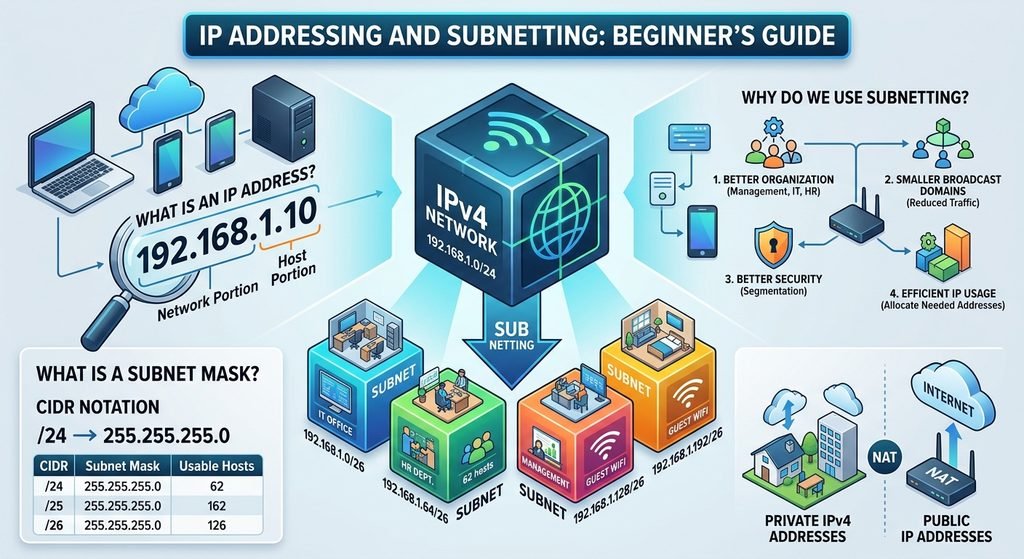
An IP address is a logical address used to identify a device on an IP network.
An IPv4 address consists of 32 bits divided into four octets.
For example:
192.168.1.10Each octet can have a value from:
0 → 255So an IPv4 address contains four numbers:
192 . 168 . 1 . 10
 ↑     ↑    ↑    ↑
Octet Octet Octet Octet
IPv4 Address Structure
An IPv4 address contains two main parts:
Network portion + Host portionFor example:
192.168.1.10/24With a /24 network:
Network: 192.168.1
Host:    10
The subnet mask tells the device which part represents the network.
What Is a Subnet Mask?
A subnet mask determines the network and host portions of an IPv4 address.
A common example is:
255.255.255.0This corresponds to:
/24So:
192.168.1.10/24means:
Network: 192.168.1.0
Host:    10
CIDR Notation
Instead of writing the complete subnet mask, we can use CIDR notation.
For example:
192.168.1.10/24The /24 means that the first 24 bits are used for the network portion.
Some common CIDR values are:
| CIDR | Subnet Mask | Usable Hosts* |
|---|---|---|
| /24 | 255.255.255.0 | 254 |
| /25 | 255.255.255.128 | 126 |
| /26 | 255.255.255.192 | 62 |
| /27 | 255.255.255.224 | 30 |
| /28 | 255.255.255.240 | 14 |
| /29 | 255.255.255.248 | 6 |
| /30 | 255.255.255.252 | 2 |
*For typical IPv4 subnets, excluding the network and broadcast addresses.
What Is a Network Address?
The network address identifies the network itself.
For example:
192.168.1.0/24The network address is:
192.168.1.0You don’t normally assign the network address to a regular host.
What Is a Broadcast Address?
The broadcast address is used to communicate with all hosts within a subnet.
For:
192.168.1.0/24the broadcast address is:
192.168.1.255So the typical usable host range is:
192.168.1.1
        ↓
192.168.1.254
Example: 192.168.1.0/24
Let’s look at the complete network:
Network Address:
192.168.1.0

First Usable:
192.168.1.1

Last Usable:
192.168.1.254

Broadcast:
192.168.1.255
That gives us:
254 usable host addresses.
Private IPv4 Addresses
Private IP addresses are commonly used inside local networks.
There are three main private IPv4 ranges:
10.0.0.0/8
10.0.0.0 → 10.255.255.255172.16.0.0/12
172.16.0.0 → 172.31.255.255192.168.0.0/16
192.168.0.0 → 192.168.255.255For example:
192.168.1.10is a private IP address.
Private addresses are commonly used inside homes and organizations.
Public IP Addresses
A public IP address is globally routable on the Internet.
Your organization may receive a public IP address from an Internet Service Provider.
A simplified network could look like:
Internal Network
192.168.1.0/24
       |
    Router
       |
Public IP
       |
   Internet
The router can use NAT to allow private devices to communicate with Internet services.
What Is Subnetting?
Subnetting means dividing a network into smaller networks.
Imagine you have:
192.168.1.0/24Instead of using one network for everything, you could divide it into multiple smaller networks.
For example:
Network 1 → 192.168.1.0/26
Network 2 → 192.168.1.64/26
Network 3 → 192.168.1.128/26
Network 4 → 192.168.1.192/26
Each /26 network provides:
62 usable host addresses.
Why Do We Use Subnetting?
Subnetting provides several advantages.
1. Better organization
You can separate different departments.
Management
192.168.10.0/24

IT
192.168.20.0/24

HR
192.168.30.0/24
2. Smaller broadcast domains
Smaller networks can reduce broadcast traffic.
3. Better security
Network segmentation can make it easier to control communication between groups.
4. Efficient IP usage
You can allocate address space according to the number of devices actually needed.
Subnetting Example
Imagine an office needs four separate networks.
We start with:
192.168.1.0/24We can divide it into four /26 networks.
Subnet 1
192.168.1.0/26Usable:
192.168.1.1
-
192.168.1.62
Broadcast:
192.168.1.63Subnet 2
192.168.1.64/26Usable:
192.168.1.65
-
192.168.1.126
Broadcast:
192.168.1.127Subnet 3
192.168.1.128/26Usable:
192.168.1.129
-
192.168.1.190
Broadcast:
192.168.1.191Subnet 4
192.168.1.192/26Usable:
192.168.1.193
-
192.168.1.254
Broadcast:
192.168.1.255Subnetting Cheat Sheet
Here’s a useful table to save for later:
| CIDR | Total Addresses | Usable Hosts |
|---|---|---|
| /24 | 256 | 254 |
| /25 | 128 | 126 |
| /26 | 64 | 62 |
| /27 | 32 | 30 |
| /28 | 16 | 14 |
| /29 | 8 | 6 |
| /30 | 4 | 2 |
The general formula for typical IPv4 subnets is:
Usable hosts = 2^host_bits - 2For /26:
32 - 26 = 6 host bits

2^6 - 2
= 64 - 2
= 62 usable hosts
How to Calculate Subnets
A useful technique is the block size.
For example:
192.168.1.0/26The subnet mask is:
255.255.255.192Calculate:
256 - 192 = 64Therefore, the networks increase by 64:
0
64
128
192
So the subnets are:
192.168.1.0/26
192.168.1.64/26
192.168.1.128/26
192.168.1.192/26
This technique becomes very useful when doing subnetting exercises.
How to Find the Subnet of an IP
Suppose you have:
IP:
192.168.1.70

Mask:
/26
The /26 networks are:
192.168.1.0
192.168.1.64
192.168.1.128
192.168.1.192
Since 70 falls between 64 and 127, the IP belongs to:
192.168.1.64/26Therefore:
Network:
192.168.1.64

First Host:
192.168.1.65

Last Host:
192.168.1.126

Broadcast:
192.168.1.127
VLSM — Variable Length Subnet Masking
Once you understand basic subnetting, you can learn VLSM.
VLSM allows different subnet sizes to be used within the same overall address space.
For example:
IT Department
/26

HR Department
/27

Management
/28

Point-to-point link
/30
This can make IP allocation more efficient.
Subnetting in Real Networks
Subnetting is used everywhere in professional IT environments.
For example:
Company Network
       |
   Core Router
       |
 ┌─────┼─────┐
 ↓     ↓     ↓
IT    HR   Guest
/24   /25   /26
Organizations can combine subnetting with VLANs, routing, and firewall policies to create structured and secure networks.
Common Beginner Mistakes
Mistake 1 — Confusing network and host addresses
For:
192.168.1.0/24192.168.1.0 is the network address, not normally a host address.
Mistake 2 — Forgetting the broadcast address
For /24:
.255is the broadcast address.
Mistake 3 — Confusing /24 with 255.255.255.0
They represent the same subnet mask.
Mistake 4 — Forgetting that subnet sizes change
For example:
/24 → 254 usable hosts

/25 → 126

/26 → 62

/27 → 30
The number of available hosts decreases as the prefix becomes larger.
How to Practice Subnetting
The best way to learn subnetting is to practice.
Try solving these:
Exercise 1
192.168.10.25/24Find:
- Network address
- First host
- Last host
- Broadcast
Exercise 2
192.168.10.130/26Find:
- Network
- First host
- Last host
- Broadcast
Exercise 3
10.10.10.200/27Find:
- Network
- First host
- Last host
- Broadcast
Don’t worry if these look difficult initially. Subnetting becomes much easier with repetition.
Useful Networking Commands
You can also examine IP configuration directly on your computer.
Windows
ipconfigMore detailed information:
ipconfig /allLinux
ip addrRouting table:
ip routeThese commands are useful when troubleshooting IP configuration.
Conclusion
IP addressing and subnetting are fundamental networking skills.
You should understand:
- IPv4 addresses
- Subnet masks
- CIDR notation
- Network addresses
- Broadcast addresses
- Private IP addresses
- Public IP addresses
- Host ranges
- Subnetting
- VLSM
Don’t try to memorize every subnet immediately.
Practice calculating networks until the process becomes automatic.
Once you understand subnetting, you’ll be much better prepared for VLANs, routing, DHCP, firewalls, VPNs, and Cisco networking.
FAQ
What is an IP address?
What does /24 mean?
/24 means that 24 of the 32 IPv4 bits represent the network portion.How many usable hosts are in a /24?
/24 IPv4 subnet has 254 usable host addresses.